Off-Campus Student Life
Party Registration
Event registration platform for off-campus student life events
Discover
The Off-Campus Student Life (OCSL) party registration program at UNC Chapel Hill allows students in single-family housing and apartments to register gatherings proactively before a noise complaint escalates to law enforcement. The program was built to foster education in how to "party smart" as well as trust between the student community, neighbors, and the Chapel Hill Police Department.
Before our involvement, the program functioned as a simple submission form where students would enter their information, which was then compiled into a spreadsheet for admins, and could later be shared with police to support patrol shifts. We reimagined this approach as a collaborative portal used by students, administrators, and law enforcement, making it far easier to register events, track activity, and educate students about parties. Before any design work began, our team focused on understanding the real experiences of all involved: the students expected to register, the OCSL administrators overseeing the process, and the police officers relying on registration data during their patrol shifts.
Research Methods
First, we surveyed students living off campus that may or may not have used this platform before. What's working now? What isn't? For those who haven't used it but should have, was it a lack of care, program knowledge, or a lack of user-friendliness with the current system? Personas were born from these surveys.
Our project manager and technical lead also did weekly interviews with OCSL staff and monthly meetings with Chapel Hill Police Department (CHPD) officers to understand the technical needs for the project. In these meetings, changes and new features would be requested from both the OCSL staff and law enforcement side of things depending on new developments or user feedback.
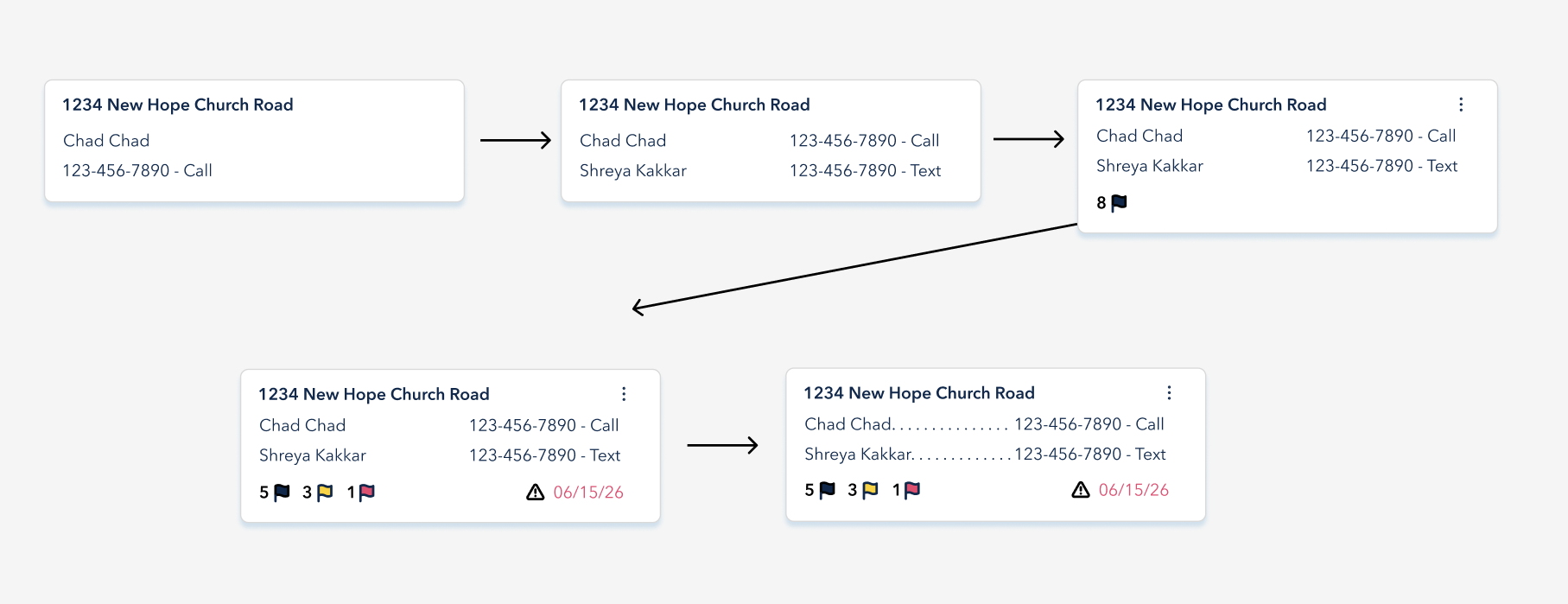
Officer Pain Points
No spatial overview of registered events during patrol, difficulty cross-referencing addresses, and reliance on printed, paper spreadsheets for every shift.
Define
With our research synthesized, we identified three primary user groups with different needs — yet all had to be served by the same platform. This multi-audience structure became the organizing principle for every design decision that followed.
Chad Chad — Student Host
Junior @ UNC living in a house on Fraternity Court
- 21 y/o Fraternity Brother
- Planning a huge party but is afraid of the law
- Needs clear confirmation and status updates - bad with deadlines
- Uses his mobile phone for everything
Patrick Porter - OCSL Admin
Chapel Hill Police Department, Patrol
- Needs to see all parties sent in via data tables
- Needs a way to manage students and edit parties/locations
- Works from a laptop in the office
- Frustrated with manually sending information to police
Officer Rivera — Chapel Hill PD
Night Patrol Officer
- Needs real-time event locations on shift
- Wants to distinguish registered vs. unregistered events
- Wants ability to add incidents directly on platform
- Works from a patrol laptop
Design Goals
Optimize
Reduce manual steps and broken experiences. Students should not have to filter their email to find a past registration, and admins should not have to manually send nightly patrol spreadsheets to the police.
Progressive Disclosure
Show only what's needed at each step. Reduce cognitive load during an already high-stakes interaction.
Transparent by Default
Every action should surface its status. Students should always know exactly where their registration stands.
Dual-Audience Design
The platform serves three different users. All experiences must feel purpose-built, not like an afterthought.
Design
We moved from lo-fi sketches to hi-fidelity wireframes based on the current OCSL branding document. The design was organized around three distinct interface modes: a student registration portal, an admin dashboard, and a police officer dashboard - each flow built for its distinct user group, keeping in mind the overlap between them. These were all done mobile first with a desktop version as well.
Student Registration Flow
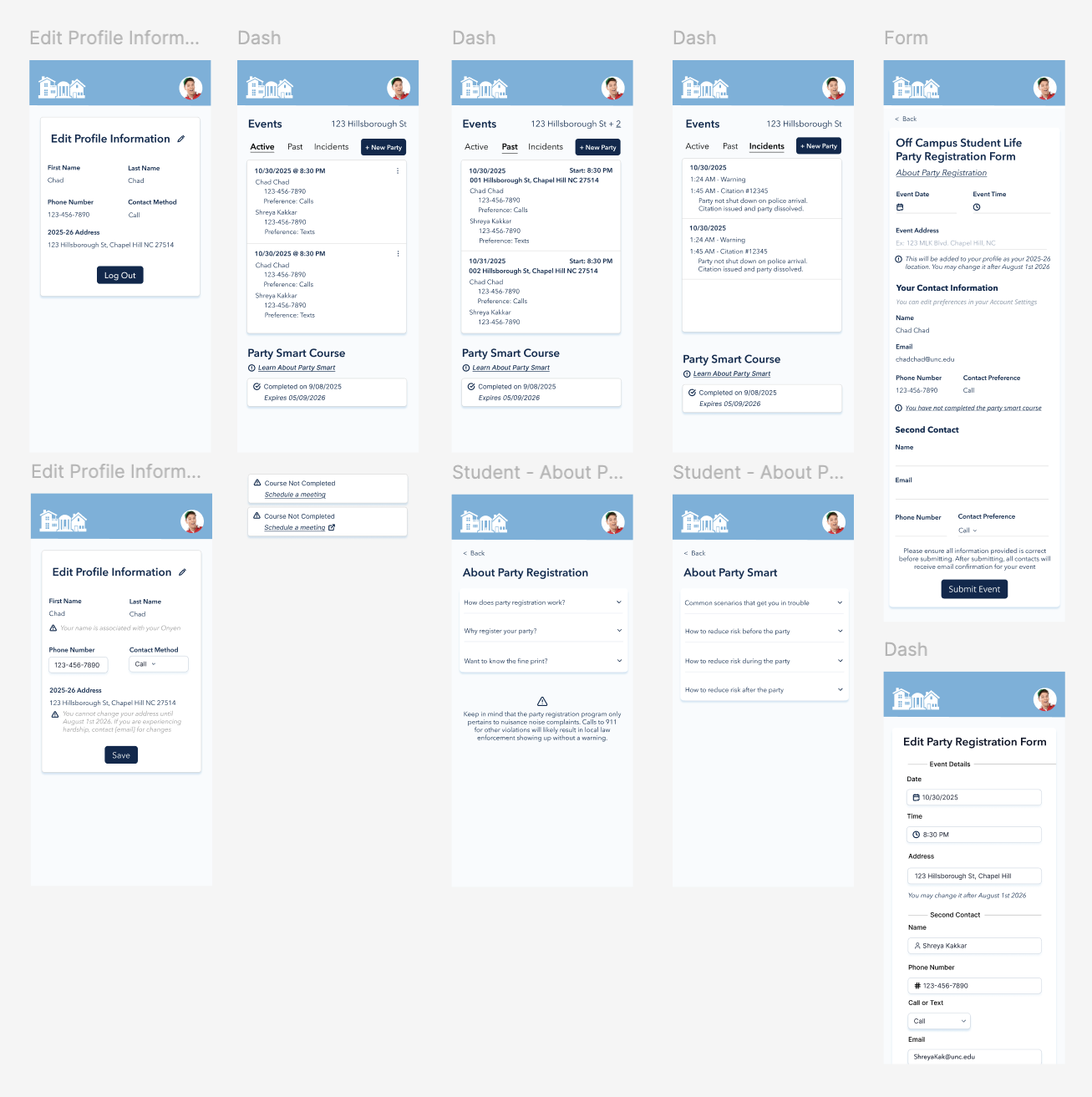
The student-facing experience was rebuilt as a dashboard, featuring active parties, past parties, and incidents (complaints, warnings, citations) alongside a step-by-step guided form with inline eligibility checks. After submission, students receive a confirmation screen and can access the active party on their dashboard (making changes if needed).
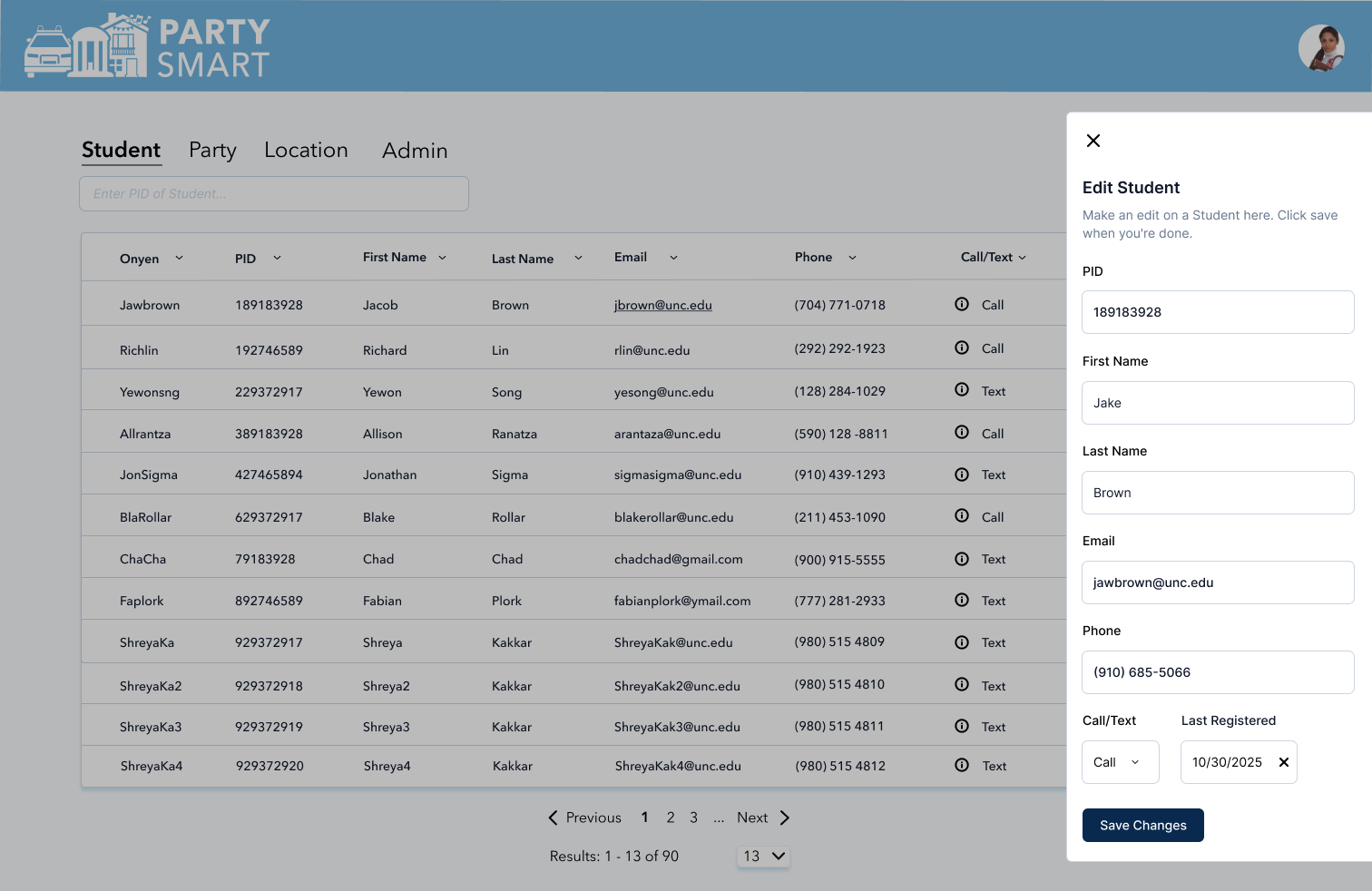
OCSL Administrator Dashboard
The admin dashboard is composed of many tables (student, party, location, and admin) where the information can be easily retrieved via search, filters, or pagination. Admins can also edit information (lets say a student wants to update their address halfway through the year, or change the second contact and isn't sure how to do it on their end) as well as add new rows in case of discrepancies.
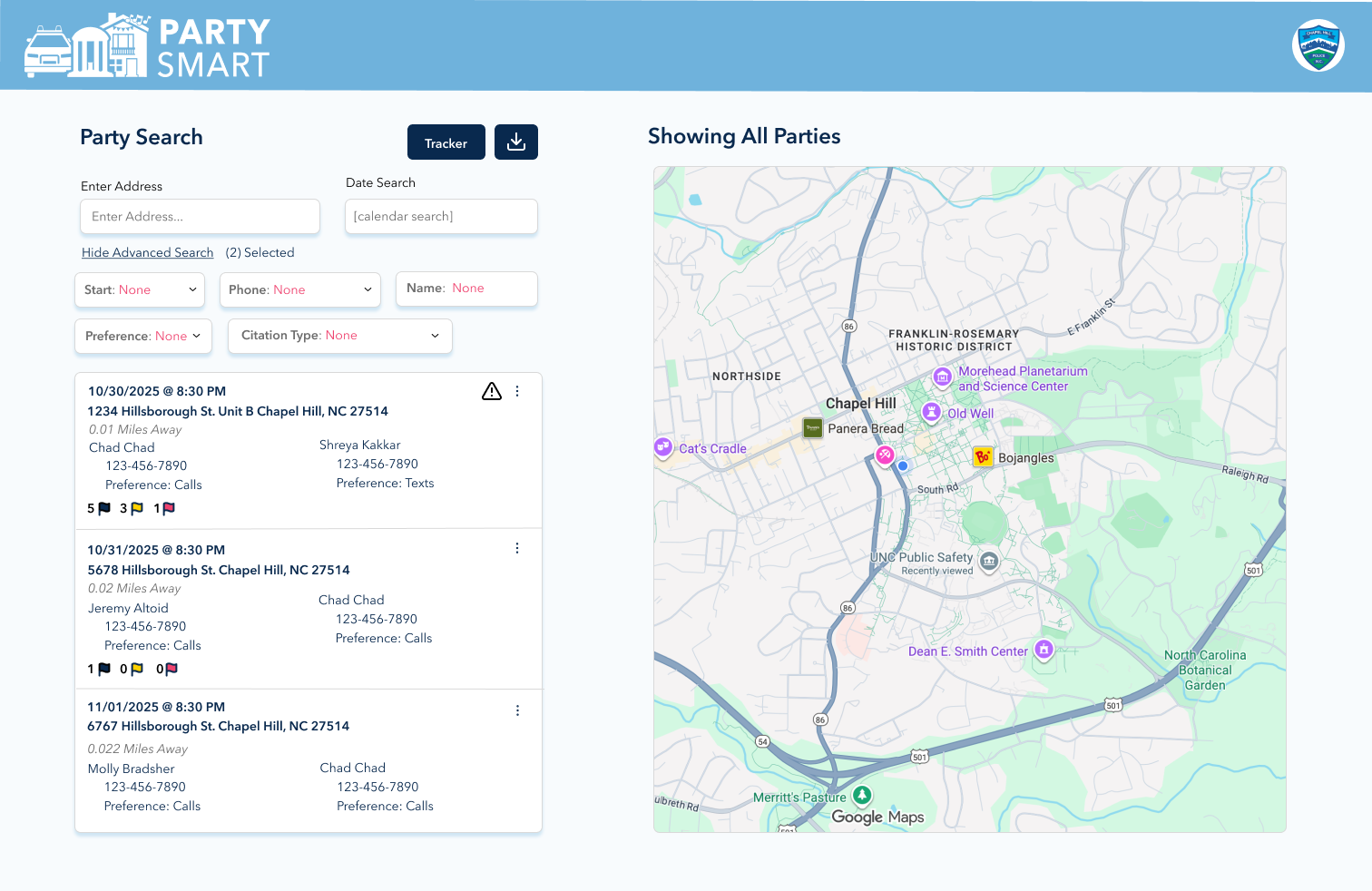
Police Officer Dashboard
The police view was build based on what information the police absolutely needed access to, sortable by custom filters and an interactive map. While student names, numbers, and call preferences will be available on the search cards, other demographics will NOT be seen to protect students that may be more susceptible to police violence. The persistent map panel shows all registered events based on the filters provided, where police can interact to quickly text or call the primary contact of the party - reducing manual load.
Accessibility & Responsiveness
All components were tested against WCAG AA contrast standards. The student registration form was optimized mobile-first, as our research showed most students are mostly using mobile phones when completing non-school activities. The officer dashboard was designed mobile-first for use on patrol tablets and phones, with a later desktop iteration for officers with access to a patrol car laptop. The admin view was designed strictly for computers, per the guidelines given to our team. Admins should always be editing from the office on a system-approved computer.
Debrief
The redesigned platform was presented in iterations to OCSL administrators and Chapel Hill PD, with a final demo at the beginning of March.
What Went Well
Stakeholders responded strongly to the fact that the various dashboards felt purpose-built for each user. The map approach for officers received the strongest praise — patrol officers said it matched their mental model far better than the existing printout system.
Administrators shared that they loved the overall design, incorporating existing branding and making the tables tab-reliant (rather than multiple excel sheets) and easily changeable rows without room for typing errors/other mistakes.
What We'd Do Differently
At first, we underestimated the complexity of the system and jumped ahead on the project before fully understanding how the system worked. For example, we created a login page for each user not knowing that students and admins would be using SSO to sign in. Another example is that we wanted to shield police from seeing all parties as well as first names as a way to ensure they aren't choosing the first party on the list, as well as protect student identities if they are at a high risk for police violence. This layer of protection was later cleared by police, as having all information would allow them to see a clearer picture of events near campus and issue incidents accordingly. A future iteration would invest more heavily in this communication layer between us, OCSL staff, and Chapel Hill PD at the beginning.
Since this was a student-organization-run project, there were many design constraints based on the limitations of the dev team. For example, the dev team was unsure how to implement real-time updates, create editable fields, display pop-ups, and incorporate the map. While some of these were figured out, we had to keep our design as simple as possible to serve as a first draft that can be improved upon later. A future iteration should address these concerns, and should invest more in help from professional developers.